Tutorial: your first app
A todo list, from dotnet new console to something you can use: a list you move through with the
arrows, a to add, Space to tick, d to delete. About a hundred lines in three files, and every
piece of it is what you would reach for in a larger application.
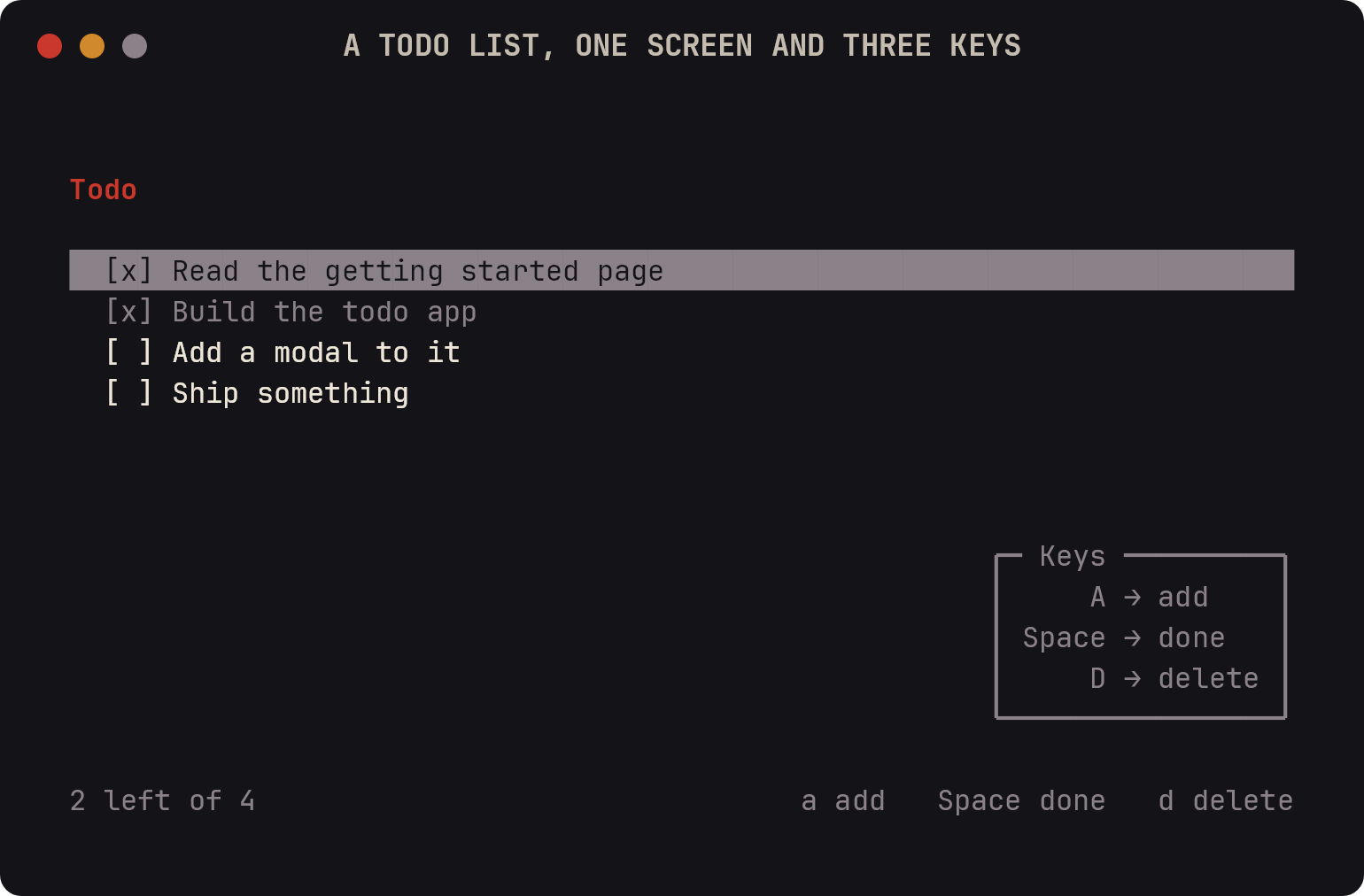
By the end you will have used a store of atoms, a
ListBox, a PaneTree laying out the screen, a
StatusBar, two modals and three
view commands.
The project
dotnet new console -o Todo
cd Todo
dotnet add package Arlecchino
dotnet add package Microsoft.Extensions.Hosting
One line goes into the project file, so the source generator can name the routes after your views:
<ItemGroup>
  <CompilerVisibleProperty Include="RootNamespace" />
</ItemGroup>
The list
Everything the application knows is one list, and a store is where it lives. A store is a plain class the container hands to whatever asks for it, so the list outlives the screen showing it — navigate away and back, and it is still there.
using System.Collections.Generic;
using Arlecchino.Atoms;
using Arlecchino.Atoms.Tracked;

namespace Todo;

public sealed record TodoItem(string Text, bool Done);

public sealed class Tasks : IArlecchinoStore
{
    public Atom<IReadOnlyList<TodoItem>> Items { get; } = new TrackedAtom<IReadOnlyList<TodoItem>>([]);

    public int Left
    {
        get
        {
            var left = 0;

            foreach (var item in Items.Value)
            {
                if (!item.Done)
                {
                    left++;
                }
            }

            return left;
        }
    }

    public void Add(string text) => Items.Value = [.. Items.Value, new TodoItem(text.Trim(), false)];

    public void Toggle(int index)
    {
        if (index < 0 || index >= Items.Value.Count)
        {
            return;
        }

        var changed = new List<TodoItem>(Items.Value);

        changed[index] = changed[index] with { Done = !changed[index].Done };
        Items.Value = changed;
    }

    public void Remove(int index)
    {
        if (index < 0 || index >= Items.Value.Count)
        {
            return;
        }

        var kept = new List<TodoItem>(Items.Value);

        kept.RemoveAt(index);
        Items.Value = kept;
    }
}
Two things are worth stopping on.
The list is an atom rather than a field: writing to Items.Value asks for a
repaint by itself, so nothing has to remember to redraw the screen. TrackedAtom also puts each edit
on the undo stack; LocalAtom is the same atom without that, for state
the user did not author.
The atom holds an IReadOnlyList and every change makes a new one. A list mutated in place looks
identical to the atom, which would then have nothing to report.
The screen
A view is a class. Its constructor parameters come from the container — the surface it draws on, the store it reads, the state it opens dialogs through — and the framework builds it when the route is shown.
using System;
using System.Collections.Generic;
using Arlecchino.Commands;
using Arlecchino.Hosting;
using Arlecchino.Input;
using Arlecchino.Layout;
using Arlecchino.Navigation;
using Arlecchino.Rendering;
using Arlecchino.Rendering.Colors;
using Arlecchino.State;
using Arlecchino.Widgets.Lists;
using Arlecchino.Widgets.Readouts;
using static Arlecchino.Layout.PaneSplit;
using static Arlecchino.Layout.PaneTree;

namespace Todo;

public sealed class TasksView : IArlecchinoView
{
    private const int HeaderRows = 2;

    private readonly Surface _surface;
    private readonly Tasks _tasks;
    private readonly ArlecchinoState _state;
    private readonly ListBox<TodoItem> _list;
    private readonly PaneTree _layout;

    public TasksView(Surface surface, Tasks tasks, ArlecchinoState state, ArlecchinoOptions options)
    {
        _surface = surface;
        _tasks = tasks;
        _state = state;

        _list = new(options.Keymap)
        {
            Render = static item => item.Done ? $"  [x] {item.Text}" : $"  [ ] {item.Text}",
            ItemStyle = static item => item.Done ? Theme.Secondary : Theme.Default,
            IsFocused = true,
        };

        var status = new StatusBar
        {
            Left = [() => $"{_tasks.Left} left of {_tasks.Items.Value.Count}"],
            Right = [static () => "a add", static () => "Space done", static () => "d delete"],
        };

        _layout = Branch(
            Rows,
            HeaderRows,
            Leaf(DrawHeader),
            Branch(Rows, PaneSize.CellsFromEnd(1), Leaf(_list), Leaf(status)));
    }

    public void Draw()
    {
        _list.Items = _tasks.Items.Value;
        _layout.Draw(_surface.Content);
    }

    public ViewRoute Handle(KeyPress key) => _list.Handle(key).Route;

    public ViewRoute HandleMouse(MouseEvent mouse) => _list.HandleMouse(mouse).Route;

    public IReadOnlyList<ViewCommand> Commands() =>
    [
        ViewCommand.For(ConsoleKey.A, static () => "add", Add),
        ViewCommand.For(ConsoleKey.Spacebar, static () => "done", () => _tasks.Toggle(_list.SelectedIndex)),
        ViewCommand.For(ConsoleKey.D, static () => "delete", Delete),
    ];

    private void DrawHeader(SurfaceRegion header)
    {
        header.WriteLine(0, "Todo", Theme.Header);
        header.WriteLine(1, _tasks.Items.Value.Count == 0 ? "Nothing yet — press a" : "", Theme.Secondary);
    }

    private void Add() => _state.RequestText(
        "What needs doing?",
        "",
        static text => text.Trim().Length == 0 ? "It needs a name" : null,
        _tasks.Add);

    private void Delete()
    {
        if (_list.SelectedIndexItem is not { } item)
        {
            return;
        }

        _state.RequestConfirmation($"Delete {item.Text}?", () => _tasks.Remove(_list.SelectedIndex));
    }
}
The layout
PaneTree states the shape of the screen once, in the constructor, rather than counting rows in
Draw. Two rows for the header, the last row for the status bar, and the list gets what is left. It
is worked out per frame, so resizing the terminal reflows it — see Layout.
The list
ListBox keeps the selection and the scrolling; it never copies what you give it, so assigning
Items on every frame is the ordinary thing to do. Render turns one item into its row, ItemStyle
colors it — done items go gray, and the selected row is drawn by the widget itself.
Keys reach it through Handle, which is why the arrows, PgUp, Home and the wheel work without
being written down anywhere.
The keys
Three keys are declared as data rather than hidden in a switch. That is what lets the framework
list them in the hints box and the
command palette, and check them for conflicts:
ViewCommand.For(ConsoleKey.A, static () => "add", Add),
The label is a delegate so that an application with translations can hand back a different string.
The dialogs
Neither dialog is a screen: ArlecchinoState opens one over the current view and hands the answer
back to a callback. Adding validates as it goes — return a message and the dialog stays open with it
underneath the field:
_state.RequestText("What needs doing?", "", Validate, _tasks.Add);
_state.RequestConfirmation($"Delete {item.Text}?", () => _tasks.Remove(_list.SelectedIndex));
RequestConfirmation starts on the negative answer, so a stray Enter cancels rather than deletes.
Every other kind — a password, a number, a slider, a date, a color, a choice — is a call of the same
shape; see Modals.
Starting it
using Arlecchino.Hosting;
using Microsoft.Extensions.Hosting;
using Todo.Navigation;

var builder = Host.CreateApplicationBuilder(args);

builder.Services
    .AddArlecchino(Configure)
    .AddGeneratedViews()
    .AddGeneratedStores()
    .StartAt(ViewKind.Tasks);

await builder.Build().RunAsync();

static void Configure(ArlecchinoOptions options)
{
    options.MinimumWidth = 60;
    options.MinimumHeight = 14;
    options.ShowOutputLine = false;
}
ViewKind.Tasks is written by the source generator: it finds every IArlecchinoView in the project
and gives each one a route named after the class without its suffix, in Todo.Navigation. Rename
TasksView and the route follows; forget to register a view and the name simply is not there.
AddGeneratedStores does the same for Tasks, so nothing about either is written down twice.
ShowOutputLine = false gives the bottom two rows of the frame back to the screen — otherwise the
framework's own output row draws over the status bar. Leave it on if you want
state.Output = "…" to have somewhere to appear.
dotnet run
Rendering a frame without a terminal
The same application can compose one frame and exit, which is how the picture at the top of this page was made — useful for a README, and for a check in CI that a screen still draws.
The whole of it goes in Program.cs. The --frame check has to come before the host is built, since
top-level statements run in the order they are written:
using System;
using System.Threading;
using Arlecchino;
using Arlecchino.Hosting;
using Arlecchino.Rendering;
using Arlecchino.Rendering.Colors;
using Arlecchino.Rendering.Terminals;
using Microsoft.Extensions.DependencyInjection;
using Microsoft.Extensions.Hosting;
using Todo;
using Todo.Navigation;

if (args is ["--frame", ..])
{
    Frame(args.Length >= 2 ? args[1] : "70x16");
    return;
}

var builder = Host.CreateApplicationBuilder(args);

builder.Services
    .AddArlecchino(Configure)
    .AddGeneratedViews()
    .AddGeneratedStores()
    .StartAt(ViewKind.Tasks);

await builder.Build().RunAsync();

static void Configure(ArlecchinoOptions options)
{
    options.MinimumWidth = 60;
    options.MinimumHeight = 14;
    options.ShowOutputLine = false;
}

static void Frame(string size)
{
    TerminalCapabilities.Color = ColorSupport.TrueColor;

    var services = new ServiceCollection();

    services.AddSingleton<IHostApplicationLifetime, NoLifetime>();
    services
        .AddArlecchino(options =>
        {
            Configure(options);
            options.StartRoute = ViewKind.Tasks;
        })
        .AddGeneratedViews()
        .AddGeneratedStores()
        .WithoutHostedService();

    using var provider = services.BuildServiceProvider();
    var parts = size.Split('x');

    provider.GetRequiredService<Surface>()
        .SetFixedSize(int.Parse(parts[0]), int.Parse(parts[1]));

    var tasks = provider.GetRequiredService<Tasks>();

    tasks.Add("Read the getting started page");
    tasks.Add("Build the todo app");
    tasks.Toggle(0);

    provider.GetRequiredService<Screen>().DrawOnce();

    Console.WriteLine();
}

namespace Todo
{
    internal sealed class NoLifetime : IHostApplicationLifetime
    {
        public CancellationToken ApplicationStarted => CancellationToken.None;

        public CancellationToken ApplicationStopping => CancellationToken.None;

        public CancellationToken ApplicationStopped => CancellationToken.None;

        public void StopApplication() { }
    }
}
WithoutHostedService builds everything except the loop that would take over the terminal, and
DrawOnce composes a single frame to stdout as ANSI text. NoLifetime stands in for the one the host
would have registered: nothing here is going to ask the application to stop.
A process started without a console of its own is told there is no color, which is right for a log and
wrong for a picture — that is what the first line of Frame overrides.
dotnet run -- --frame 76x18
Where to go next
- The list is gone when the application closes. An async store loads itself from disk before the first frame, which is the natural next step.
- A second screen is another
IArlecchinoViewand a route the generator writes for you — see Views and navigation. - Anything the list cannot express is a widget of your own: a class with
Draw(SurfaceRegion), andIArlecchinoInteractiveWidgetwhen it takes keys. A dialog of your own is aModalin the same way. - Every label above is a literal, which is fine until the second one says the same thing differently. A TOML file and the localization generator turn each into a name the compiler checks — worth doing before there are twenty of them.
- Showcase is the larger version of all of this.